A GST invoice is the document that lets you collect GST from a customer — and lets that customer claim input tax credit (ITC) on it. Get a detail wrong and your buyer can lose credit, which is a quick way to lose a client. This guide explains exactly what an Indian GST tax invoice must contain, how to fill each part, and how to produce one in about a minute with the free GST invoice generator.
What is a GST invoice?
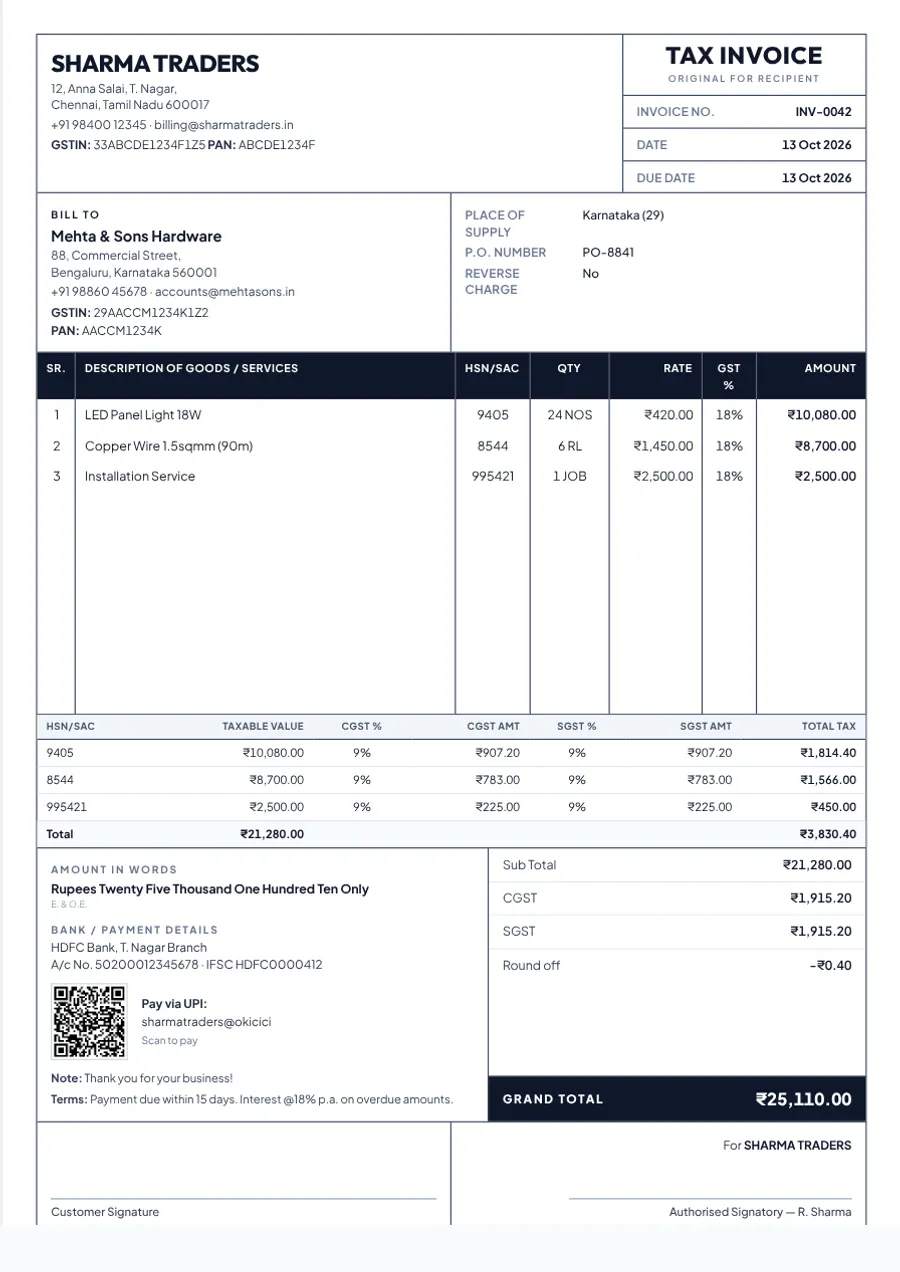
A GST tax invoice is the bill a GST-registered seller issues for supplying goods or services. It is governed by Section 31 of the CGST Act, 2017 and Rule 46 of the CGST Rules, which list the particulars it must carry. It records what was sold, the value, the tax charged and who the parties are.
Who can (and cannot) issue a GST tax invoice
- Regular GST-registered businesses issue tax invoices and charge GST.
- Composition-scheme dealers cannot charge GST on their sales. They issue a bill of supply instead — see GST invoice vs bill of supply.
- Suppliers of exempt or nil-rated goods and services also issue a bill of supply.
- Unregistered businesses cannot charge GST at all. A plain bill or cash memo — such as the general bill generator — is the right document.
Mandatory details on a GST invoice (Rule 46)
Every tax invoice must show the following. Missing items are the most common reason a buyer's ITC claim is questioned.
- Supplier's name, address and GSTIN
- A unique, consecutive invoice number — up to 16 characters, using letters, numbers, a hyphen (-) or a slash (/) only
- Date of issue
- Recipient's name, address and GSTIN (if registered)
- For an unregistered recipient on an invoice of ₹50,000 or more: name, address and the state with its code
- HSN code for goods or SAC for services
- Description of the goods or services, quantity and unit
- Total value, any discount, and the taxable value
- Rate and amount of tax — CGST and SGST (or UTGST), or IGST, plus cess where applicable
- Place of supply (with the state name) for inter-state supplies
- Whether tax is payable on reverse charge
- Signature or digital signature of the supplier or authorised representative
How to create a GST invoice in 7 steps
- Open the generator. Go to the free GST Tax Invoice generator. There is nothing to install and no account to create.
- Enter your business details. Add your business name, address, GSTIN, PAN, phone and email. You can add a logo and your UPI ID too. These are remembered in your browser, so you only type them once.
- Add your customer. Enter the customer's name and address. For a registered business, add their GSTIN — they need it to claim ITC.
- Choose the supply type. Select Within state (CGST + SGST) or Inter-state (IGST), and fill in the place of supply. The next section shows how to decide.
- Add line items. For each item enter the description, HSN/SAC code, quantity, unit, rate and GST rate. Subtotal, tax split, grand total and amount in words update live as you type.
- Add bank details, terms and signature. Add your bank account and IFSC, payment terms (for example “payment due within 15 days”) and upload a signature or stamp image if you use one.
- Download the PDF. Press Download PDF and choose “Save as PDF” in the print dialog. If anything required is missing, the form highlights it first. Press Save to keep a draft in My Documents.
CGST + SGST or IGST? A worked example
The tax rate does not change — only how it is split. If the place of supply is in the same state as the supplier, the tax is split equally into CGST and SGST. If it is in a different state, the full amount is charged as IGST. Take a sale of ₹10,000 of goods taxed at 18%:
| Within one state | Between two states | |
|---|---|---|
| Taxable value | ₹10,000 | ₹10,000 |
| CGST @ 9% | ₹900 | — |
| SGST @ 9% | ₹900 | — |
| IGST @ 18% | — | ₹1,800 |
| Invoice total | ₹11,800 | ₹11,800 |
Place-of-supply rules for some services work differently from goods, so check the rule for your service if you are unsure.
Which GST rate should you charge?
The rate depends on the HSN/SAC code of what you sell. Since the GST rate rationalisation on 22 September 2025, most goods and services are taxed at 5% or 18%, with 40% on a small list of select items, alongside 0% for exempt items and special rates such as 3% on gold. Always confirm the rate for your specific code on the official GST portal or with your chartered accountant. In the generator you can set the rate separately on every line item.
HSN and SAC codes: how many digits?
- Annual turnover up to ₹5 crore: 4-digit HSN on B2B invoices; optional on B2C invoices.
- Annual turnover above ₹5 crore: 6-digit HSN on all invoices.
- Services use SAC codes, which begin with 99.
These limits come from Notification 78/2020-Central Tax as amended. Check the current text if your turnover is near a threshold.
Invoice numbering, copies and timelines
- Numbering: consecutive, never repeated within a financial year. You may run separate series (for example one per branch), each consecutive. BillsFreind auto-increments the number for every document type.
- Copies: for goods, three — original for the recipient, duplicate for the transporter, triplicate for the supplier. For services, two — original for the recipient and duplicate for the supplier.
- When to issue (goods): on or before removal of the goods, or on or before delivery if they do not move.
- When to issue (services): within 30 days of the supply (45 days for banks and NBFCs).
- Corrections: once issued, mistakes are generally fixed with a credit note or debit note rather than by editing the original.
E-invoicing: does it apply to you?
E-invoicing — registering each B2B invoice on the government's Invoice Registration Portal to get an IRN and QR code — is mandatory for businesses with aggregate turnover of ₹5 crore or more, in force since 1 August 2023. Below that limit, a normal PDF invoice with the mandatory details is enough. BillsFreind does not connect to the e-invoice portal, so it is designed for businesses under the threshold.
6 common GST invoice mistakes
- Wrong or missing customer GSTIN — the buyer cannot claim ITC.
- Charging CGST + SGST on an inter-state sale (or IGST on a local one).
- Leaving out the HSN/SAC code where it is required.
- Duplicate or non-sequential invoice numbers.
- Issuing a tax invoice when you should issue a bill of supply (composition dealers, exempt supplies) — see the difference.
- Forgetting the place of supply on inter-state invoices.
Related guides: GST invoice vs bill of supply, how to calculate GST on an invoice, HSN code vs SAC code, proforma invoice vs tax invoice, choosing a free invoice generator in India.
Ready to make one? Fill in the form, check the live preview and download a print-ready A4 PDF — free, with no sign-up and no watermark. Create a GST invoice
Frequently asked questions
Can I create a GST invoice for free?
Yes. BillsFreind's GST invoice generator is free with unlimited invoices, no sign-up and no watermark. You fill in the form and download a PDF.
Is a PDF GST invoice valid?
Yes, an electronic invoice is accepted as long as it carries all the mandatory particulars. If your business is liable for e-invoicing, it must also carry the IRN and QR code generated by the government portal.
What is the difference between a tax invoice and a bill of supply?
A tax invoice charges GST and lets the buyer claim input tax credit. A bill of supply is issued by composition-scheme dealers and for exempt supplies, and does not show tax. Read the full comparison in our guide to GST invoice vs bill of supply.
Do I need a GSTIN to make an invoice?
You need a GSTIN to issue a GST tax invoice. If you are not GST-registered, issue a normal bill without GST, such as a cash memo.
Related guides
- How to Calculate GST on an Invoice (With Examples)
- Proforma Invoice vs Tax Invoice: What's the Difference?
- HSN Code vs SAC Code: What's the Difference?
- Delivery Challan vs Invoice: What's the Difference?
By BillsFreind Team · 2026-10-13 · 6 min read