Whether you run a shop, freelance, or fix things for a living, you need to hand customers a proper bill. Spreadsheet templates break when you change a formula, and paid software is overkill for a few bills a month. A free online invoice maker needs only a browser. This guide shows what an invoice must include, how to make one in about a minute with BillsFreind, and how it differs from a payment receipt — the document you issue once the money arrives.
What every invoice should include
Whatever you sell, a clear invoice has the same core parts. If you are GST-registered, a few more are mandatory — see our GST invoice guide.
- Your details: business or personal name, address, phone and email (plus GSTIN and PAN if you have them).
- Customer details: name and address.
- Invoice number: unique and sequential, such as BILL-0042.
- Dates: the date of issue and, ideally, a due date.
- Itemised list: description, quantity, rate and amount for every line.
- Totals: subtotal, any discount, taxes if applicable, and the final amount payable — in numbers and in words.
- Payment details: bank account, IFSC or UPI ID so the customer knows how to pay.
- Terms and signature: payment terms, notes, and an authorised signature.
How to make an invoice online for free in 6 steps
- Pick the right format. Selling goods in a shop? Use the general bill / cash memo. GST-registered? Use the GST invoice. Electrician, plumber or mechanic? There are dedicated formats for electricians, plumbers and garages. Need to quote first? Use the quotation maker.
- Enter your business details once. Add your name, address and contact details, and a logo if you like. BillsFreind remembers them in your browser so the next bill starts pre-filled.
- Add your customer. Type the customer's name and address, and their phone number if you want it printed on the bill.
- List the items. Add each product or service with quantity, unit and rate. Mix parts and labour where the format allows it. Totals, discounts and amount in words calculate as you type. Press Sample to see a filled example first.
- Add payment details. Enter your UPI ID to print a scannable payment QR code, and add bank details and payment terms so there is no confusion about how and when to pay.
- Preview and download. Check the live A4 preview, press Download PDF and choose “Save as PDF”. Share the file on WhatsApp or email, or print it. Press Save to keep a copy in My Documents.
Free invoice maker vs spreadsheet vs paid software
| Option | Cost | Setup | Best for |
|---|---|---|---|
| Online invoice maker (BillsFreind) | Free | None — no sign-up | One-off and small-business bills, tradespeople, freelancers |
| Excel / Google Sheets template | Free | Build or download, keep formulas intact | Fully custom layouts |
| Paid accounting software | Monthly subscription | Account and onboarding | Inventory, GST filing, e-invoicing, many users |
Invoice vs payment receipt: what is the difference?
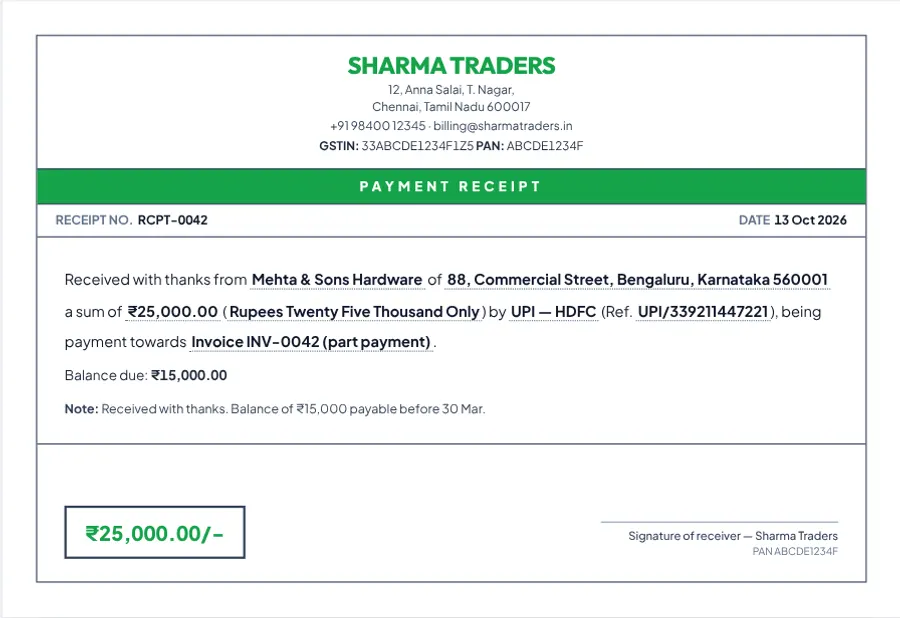
An invoice asks for payment. It is issued when you sell, and states what is owed and by when. A payment receipt confirms that payment has arrived. It is issued when you are paid, and states how much was received, by whom and how. Many customers — especially businesses claiming expenses — will ask for both.
| Invoice | Payment receipt | |
|---|---|---|
| Purpose | Request payment | Confirm payment received |
| Issued | When goods or services are supplied | When money is received |
| Key details | Items, rates, taxes, due date | Amount received, payment mode, reference, balance due |
| Who needs it | Customer, to pay and to book the expense | Customer, as proof of payment |
How to make a payment receipt
- Open the free payment receipt generator.
- Enter who received the money and who paid it.
- Fill in the amount, the payment mode (cash, UPI, NEFT or cheque), the transaction or cheque reference, and what the payment was for — for example “Invoice BILL-0042”.
- If it is a part payment, enter the balance due so both sides have a clear record.
- Download the PDF and send it to the payer. Issue a fresh receipt for every instalment.
Renting out a property? Tenants use monthly proof of rent to claim HRA, and the rent receipt generator is set up for exactly that. If you take an advance payment against future services in a GST-registered business, GST law may require a receipt voucher, so check with your accountant.
Tips to get paid faster
- Invoice the same day the work is done, while it is fresh.
- Put a due date on it — “payment due in 7 days” works better than nothing.
- Make paying effortless: a UPI QR code on the bill removes the need to type details.
- Number invoices consistently so both of you can find them later.
- Spell out late-payment terms in the notes, even a single line.
- Send a polite reminder with the PDF attached the day after the due date.
Keep your records safe
BillsFreind stores your saved documents only in your own browser — nothing is uploaded. That is great for privacy, but clearing your browser data also clears your saved bills. For anything you may need later, use the JSON button to export a backup and keep the PDF alongside your accounts.
Related guides: invoice vs bill vs receipt, choosing a free invoice generator in India, how to make a rent receipt for HRA, how to create a GST invoice, electrician, plumber and mechanic bill format.
Make your first invoice now. Pick a format, fill in the details and download a clean A4 PDF in about a minute. Make a free invoice
Frequently asked questions
Is it really free to make an invoice online?
Yes. BillsFreind has no sign-up, no limit on the number of invoices and no watermark on the PDF.
Do I need an account to make an invoice?
No. Everything runs in your browser. Your business details and saved documents stay on your own device.
Can I add my logo and a payment QR code?
Yes. Upload a logo, and enter your UPI ID to print a scannable payment QR code on the bill.
Is a free online invoice legally valid?
An invoice is a commercial record of a sale. GST-registered businesses must also include the particulars required by GST law, so use the GST invoice format if that applies to you.
What is the difference between an invoice and a payment receipt?
An invoice requests payment for goods or services supplied. A payment receipt confirms that the payment has been received.
Related guides
- Electrician, Plumber & Mechanic Bill Format: What to Include
- Best Free Invoice Generator in India: What to Look For
- Invoice vs Bill vs Receipt: What's the Difference?
- How to Calculate GST on an Invoice (With Examples)
By BillsFreind Team · 2026-10-13 · 5 min read